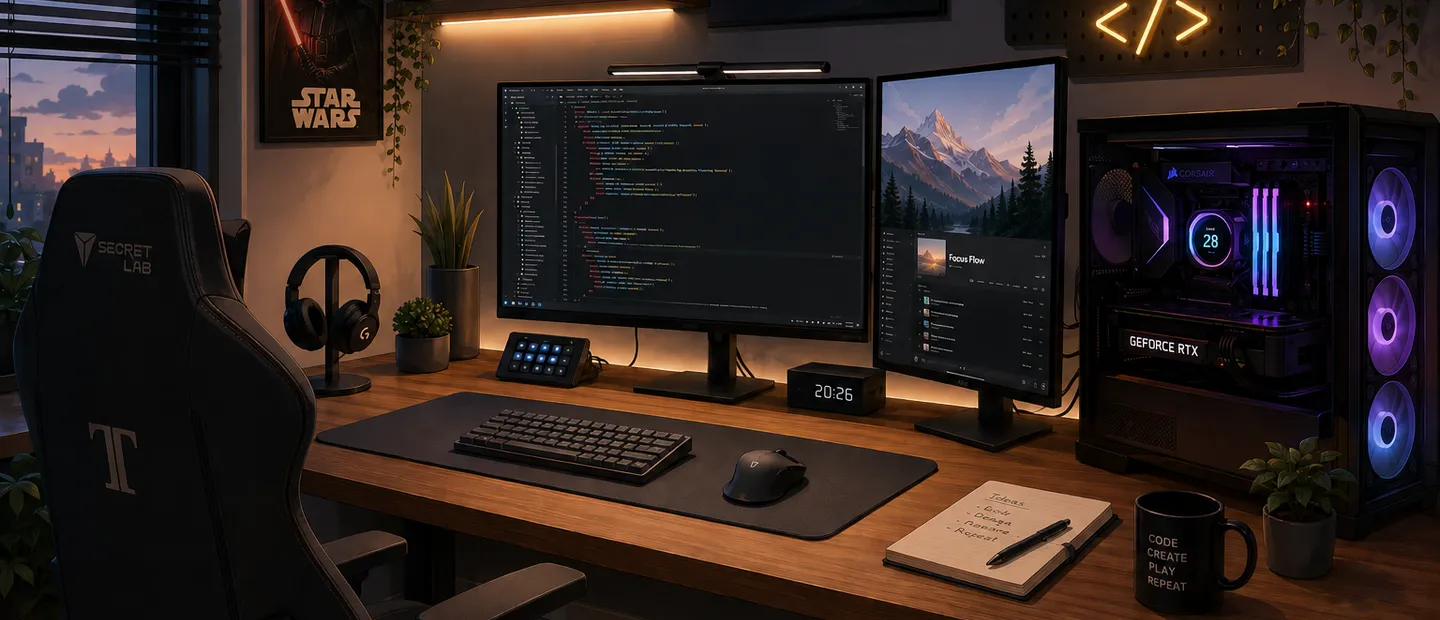
My home setup is not built for just one thing.
I use it for coding, gaming, 3D work, testing technologies, video editing, image editing, and generally experimenting with whatever I feel like that day.
So I do not see it as only a dev setup or only a gaming setup. For me it is a balanced mix: a space where I can build projects, create things, and also disconnect by playing.
What I use this setup for
The main use changes a lot depending on the day.
Some days I use it almost exclusively for coding: opening VS Code, running local environments, testing components, adjusting styles, building websites, or exploring new tech.
Other days are more visual: Figma, Affinity, Blender, DaVinci Resolve, or any tool I need for design and content work.
And then there is gaming, which also matters. Recently I have played titles like Expedition 33, Forza Horizon 6, 007: First Light, Lego Batman, and I am replaying Red Dead Redemption 2.
In short, I wanted a setup that did not force me to choose between productivity, creativity, and leisure. I wanted something comfortable for long sessions, powerful enough not to bottleneck, and flexible enough for very different workflows.
A setup built over years
This setup did not appear overnight.
It evolved over time by replacing parts, refining peripherals, and adapting to what I needed at each stage. It is not a one-shot build; it is an ongoing iteration.
The latest major upgrade was GPU, case, and PSU. With those changes, the PC is now very close to my ideal point: powerful, clean, future-proof, and ready for both development and gaming/editing.
But one part has been here much longer: a 2014 HDD.
It is not the fastest component, and technically not the most important one, but it has personal value. It came from the first PC I was gifted, and that machine played a big role in me becoming both a developer and a gamer.
That was the system where I started tinkering: installing things, breaking them, fixing them, gaming, trying software, and learning how everything works. I like that a piece of that first machine still lives in this setup.
The hardware
I do not want this to read like a product sheet, but a clear hardware list is useful.
PC
- CPU: AMD Ryzen 9 7900X
- GPU: RTX 5070 12GB
- RAM: 32GB DDR5
- Motherboard: Gigabyte X670 AORUS ELITE AX
- Storage:
- 2TB NVMe
- 1TB NVMe
- 1TB HDD
- Case: Corsair 4000D RS ARGB
- PSU: Corsair RM1000x Shift
- Cooling: Corsair iCUE H100i
It is a very hybrid PC. Plenty of power for web development, heavy projects, editing, 3D, and multitasking, while still clearly capable for gaming.
It is not only a coding machine, but not a gaming-only rig either. The value is exactly in that middle ground.
Peripherals and desk
- Main monitor: AOC 27” QHD 165Hz curved
- Second monitor: 24” 1080p
- Keyboard: Logitech MX Keys S
- Mouse: Logitech MX Master 3S
- Mousepad: Logitech Studio Series
- Headset: Logitech G Pro Wireless
- Chair: Secretlab TITAN Evo
- Desk: handmade 180x80 cm sit-stand desk
This is where you can really see it is not built just for gaming.
The keyboard and mouse, for example, are not the most gaming-focused choices, but for coding, browsing, design, and long work sessions they are extremely comfortable.
Software and tools
Hardware matters, but the setup would not be the same without the software stack.
My main OS is Windows 11, mostly because it is where everything is centralized: development, games, editing, and design.
For coding I use VS Code as the main editor. Most web projects and quick experiments happen there. For .NET projects I use Visual Studio, still the most convenient option in that ecosystem.
For terminal I use Warp, and for Linux environments I use WSL2 with Ubuntu 22.04. I also use DDEV when I need local web environments.
On the creative side: Figma for UI design, Affinity for image editing, Blender for 3D, and DaVinci Resolve for video editing.
I also use Claude for AI support and Brave as my main browser.
Quick summary:
- Operating system: Windows 11
- Main editor: VS Code
- .NET development: Visual Studio
- Terminal: Warp
- Linux: WSL2 with Ubuntu 22.04
- Local environments: DDEV
- UI design: Figma
- Image editing: Affinity
- 3D design: Blender
- Video editing: DaVinci Resolve
- AI: Claude
- Browser: Brave
Comfort over aesthetics
Even with a powerful PC, comfort is the most important part for me.
The 180x80 cm desk gives me actual space to work without feeling cramped. I can keep keyboard, mouse, monitors, a notebook, extra devices, and still have room to move.
Because it is height-adjustable, I can change posture during long sessions. I do not stand all day, but having that option helps a lot.
Peripherals follow the same logic. I did not choose MX Keys S + MX Master 3S for gaming performance, but for daily comfort. For typing, coding, browsing, design, and multi-window work, it is a great combo.
That is one of the core principles of this setup: it is not built to look good in a photo, it is built to be used for many hours.
What I would change
Even though I am very happy with the current setup, there are a few things I would change over time.
First: monitors. Right now I use a 27” curved QHD AOC as primary plus a 24” secondary display.
After using a curved monitor for a while, I do not think I would buy one again as my main display. It is not bad, but for coding, design, and editing I prefer flat panels.
My future plan is to move the curved monitor to secondary and get a 4K panel as primary. For development, design, editing, and general use that would make more sense.
I would also change the headset. Logitech G Pro Wireless is fine, but that is one area where I still see room for improvement.
I do not expect major changes from now on. I will likely keep refining details, but the base is already very close to what I want.
Conclusion
In the end, this setup is not just about good components.
It is about having a space where I can code comfortably, test ideas, edit, design, play, and disconnect without feeling limited by the machine or the desk.
It has evolved over years and will likely keep evolving in small ways, but right now it is very close to ideal for me.
It is not perfect or final forever, but it matches how I use my computer today: to code, create, and play.